
The best Shopify product image size for most stores is a square 2048 x 2048 px image, which is what Shopify's own help centre says usually displays best for square product images. Shopify accepts product images up to 5000 x 5000 px (25 megapixels) and smaller than 20 MB, and the best file types are PNG followed by JPEG. Just as important as the size is using one consistent aspect ratio for every main image, so your collection grid lines up.
That's the short answer. Below is the rest of what I check when I build or fix a Shopify store: which ratio to pick (square, portrait or rectangle), what happens on mobile, file size and formats, zoom, how to add, change, replace and delete product photos in the Shopify admin, image alt text for SEO, and where on-model lifestyle shots fit in.
Shopify product image size: 2048 x 2048 px and the other numbers
Here are the Shopify image sizes and Shopify product photo requirements in one table, from help.shopify.com (checked November 2026), with my own recommendation for each. If you're looking for the Shopify product image size limit or the Shopify product image upload size, it's the first two rows.
| Spec | Shopify's limit or guidance | What I recommend |
|---|---|---|
| Maximum dimensions | Up to 5000 x 5000 px, or 25 megapixels | No need to go near it - 2048 px on the long side is plenty |
| Maximum file size | Smaller than 20 MB | Aim for well under 1 MB per image for speed |
| Square images | 2048 x 2048 px usually displays best | 2048 x 2048 px for 1:1 themes |
| Portrait images | No fixed size given | 2048 x 2560 px (4:5) or 1600 x 2000 px |
| Best file types | PNG, then JPEG | JPEG for photos, PNG for graphics and transparent cut-outs |
| Also accepted | TIFF, BMP, GIF, SVG, HEIC, WebP | Convert HEIC phone photos before uploading if you edit them elsewhere |
| Aspect ratio | Use a consistent ratio for featured (main) images | Pick one ratio for the whole catalogue and stick to it |
| Alt text | Maximum 512 characters, 125 or less recommended | One plain sentence: product, colour, what the picture shows |
Why 2048 px? It is big enough for zoom and high-density phone screens, small enough to upload and manage, and themes that request images through Shopify's image CDN at set widths serve smaller copies to smaller screens, so a large master image doesn't have to mean a slow page on a phone.
So the best size for Shopify product photos is around 2048 px on the longest side. Beyond that, the Shopify product image dimensions you choose come down to the ratio.
Square, portrait or rectangle: choosing the ratio
The Shopify product image size ratio matters more than the pixel count. Your theme shows product cards side by side in collection grids, and mixed shapes make the grid jagged. Pick one of these and use it for every main image:
- 1:1 square - the safe default. It suits most product templates, works for marketplaces and Instagram, and is what the 2048 x 2048 px guidance is for.
- 4:5 portrait (vertical) - my choice for clothing and on-model photos. A Shopify product image size portrait like 2048 x 2560 px shows the whole outfit, and on a phone a taller image fills more of the screen.
- 2:3 portrait - also good for fashion, and it is the Pinterest shape, so one set of pictures can do both jobs.
- Landscape rectangle (3:2 or 16:9) - rarely right for a product image, but ideal for homepage banners, slideshows and collection header images.
Most themes let you choose how the product card image is shown - "square", "portrait", "adapt to image" or similar - in the theme editor under the collection or product grid settings. That setting controls the Shopify product card image size and the Shopify product grid image size on collection pages. If your Shopify product images are different sizes and you can't reshoot, set the card to a fixed ratio and the theme will crop them to match. If you use a fixed ratio, keep the product centred with some space round it so nothing important gets cut off.
Shopify mobile image size and product page images
Plenty of your shoppers will see a product on a phone before anything else, so judge your Shopify product page image dimensions on a phone first. A few things I see again and again:
- There is no separate mobile image. On a standard product page the same image is used on every device, and a well-built theme serves a smaller copy of it on mobile. A portrait 4:5 image looks larger on a phone than a square one, and a landscape one looks smallest.
- Leave room for the interface. On mobile the first image sits under the header and above the price and buy button. Fill the frame with the product rather than empty background.
- Swipe galleries need consistency too. If image two is a different shape from image one, the page jumps as shoppers swipe through a Shopify product page image slider or carousel.
- Test on a real phone. Open the product page, swipe the gallery, tap to zoom and scroll down. Ten seconds on a real device beats any spec sheet.
File size, formats and fixing blurry or slow images
Shopify will take a file up to 20 MB, but that doesn't mean you should upload one. Big files take longer to upload, clog up your admin and can slow your store down where a theme loads the original. Here is how to deal with the common problems:
| Problem | Usual cause | Fix |
|---|---|---|
| Shopify product images blurry | Uploaded too small (under about 1000 px), or upscaled by the theme to fill a big slot | Re-export at 2048 px on the long side from the original photo |
| Shopify product images too big on the page | Theme set to "adapt to image" with tall images, or very large dimensions | Choose a fixed card ratio in the theme editor, and crop images to the same ratio |
| Shopify product image size too big to upload | Over 20 MB or over 25 megapixels | Resize to 2048 px and save as JPEG at around 80% quality |
| Shopify product images not loading | Unsupported format, a failed upload, or an app or custom code breaking the gallery | Re-upload as JPEG; test with apps disabled in a theme preview |
| Different sizes in the grid | Mixed aspect ratios across products | Pick one ratio and re-crop, or set a fixed ratio in the theme |
Use JPEG for photographs, PNG for logos, graphics and anything with transparency, and keep your original high resolution files somewhere safe so you can re-export when your theme changes. If your store still feels slow after sorting images, my post on app performance covers the next suspects.
Shopify product image zoom
Zoom is a theme feature, not a separate Shopify setting. Most modern themes offer click-to-enlarge (a lightbox) and some offer Shopify product image zoom on hover; you switch it on in the theme editor on the product page template, usually under the product media settings. Two things decide whether zoom looks good:
- Resolution. Zoom only shows the detail that is in the file. A 2048 px image zooms well; an 800 px one goes soft straight away.
- Sharpness at source. Focus, light and a steady camera matter more than megapixels. A sharp 2048 px photo beats a blurry 5000 px one.
Shopify product image change on hover, where the second image appears when a shopper hovers over a product card, is also a theme setting. It works best when image two is an on-model or lifestyle shot of the same product.
How to add, change and delete product photos in Shopify
These steps are from Shopify's help centre for the admin on desktop.
How to add product photos on Shopify
- From your Shopify admin, go to Products.
- Click the product you want to edit.
- In the Media section, click Upload new and choose the file, drag and drop files into the Media section, or click Select existing to pick from files already in your store.
The Media section takes images, 3D models and videos, so yes, you can add video to Shopify product images and it shows in the same gallery.
How to change product photos on Shopify: main image and order
In the Media section, drag the image you want into the first image's place. The first media item is used as the product's featured image - the one on collection pages, in search results and when the link is shared. You can also click the Manage media icon and drag to reorder there.
How to delete product photos on Shopify
In the Media section, hover over the image, tick its checkbox and click Remove. Removing it from a product doesn't delete the file from your store; to do that, delete it in Content > Files.
Replace a product image
To swap a file everywhere it is used, go to Content > Files, click the Replace icon next to the file name and choose the new file. To change a product photo on one product only, upload the new one, drag it into place and remove the old one.
As for how to edit product photos on Shopify without leaving the admin: Shopify's help centre says the file editor can change an image from a text prompt and replace its background with a colour. For crops and colour corrections, edit your original file and upload it again.
Shopify bulk upload product images with a CSV
For a large catalogue, use a product CSV import. Each row can carry an image URL, an image position (images show in ascending order from 1) and image alt text. Shopify downloads the images during the import, so the URLs must be publicly accessible over https with no password. Uploading the images to Content > Files first is an easy way to get URLs for the CSV.
Shopify product variant images
Each variant can have its own image, so when a shopper picks "Navy" the gallery shows the navy one. Open the product, click the image icon next to the variant in the Variants section, choose an existing product image or click Add image, then click Done and Save.
Image alt text for SEO
Alt text describes an image for screen readers, appears if the image fails to load, and helps search engines understand what a picture shows. Shopify allows up to 512 characters but recommends 125 or fewer.
To add it, open the product, click an image to open the media preview, click Add alt text, type it and click Save alt text. You can also set alt text in bulk with the CSV import. Missing alt text is one of the eight reasons in why your Shopify store isn't ranking on Google.
Good product image alt text is short and specific:
- Weak: "IMG_4021.jpg", "product photo", or the same text on every image.
- Better: "Grey cotton hoodie with small chest logo, front view".
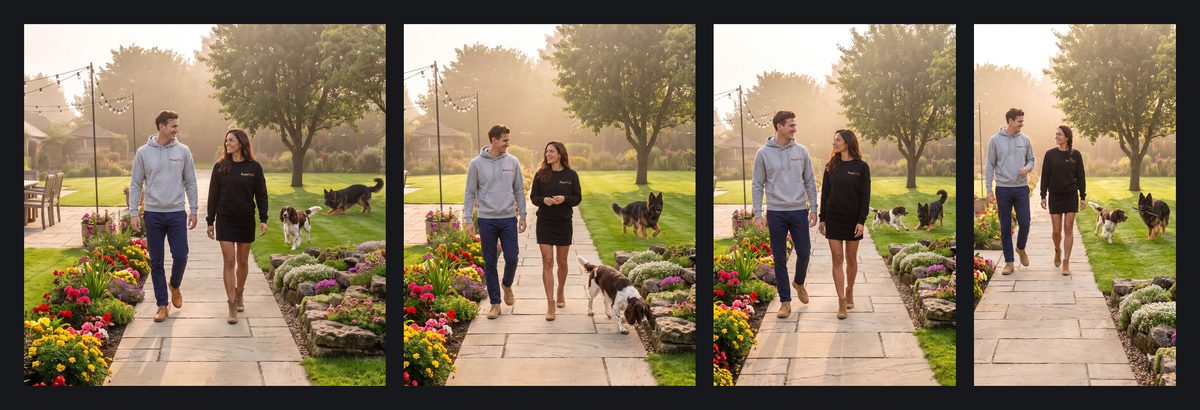
- Lifestyle shot: "Woman in a grey cotton hoodie walking a garden path with a springer spaniel".
Use the product name and colour naturally, describe what is different about each image, and don't stuff keywords. The hard part isn't writing one good alt text; it's writing hundreds of different ones across a catalogue. Intellify's guides go further on Shopify image alt text and bulk editing alt text in Shopify, and missing alt text is one of the fixes in why your Shopify store isn't ranking on Google.

Image alt text for every product photo, written for you
Intellify, my AI SEO app for Shopify, checks whether each product has at least three images and whether every one has valid, varied alt text. It then writes a unique alt text for each image (three or more words, with a product keyword) using Anthropic's Claude. You apply it per image or for all images at once, nothing changes until you click Apply, and every change can be undone.
Your product images also feed your ads: Meta's dynamic product ads pull them from your catalogue, so the same sizes apply there. My Meta Pixel Shopify setup guide covers the tracking side, and better photos are one of the fixes in why your Shopify conversion rate is low.
A simple Shopify product photography guide
If you're working out how to take product photos for Shopify yourself, a phone and a window will do more than you think. My product photography tips, in short:
- Light: soft daylight from a window to the side, no overhead lights mixed in.
- Background: plain white or light grey for the main image, so every product matches.
- Framing: shoot a little wider than you need, then crop to your chosen ratio. Keep the product in the same place in every frame.
- Angles: front, back, side, a detail close-up and one shot that shows scale or use.
- Export: 2048 px on the long side, JPEG, a descriptive file name like
grey-cotton-hoodie-front.jpg.
The shot most stores are missing is the last one: the product worn, held or used. On-model photos and lifestyle images help shoppers picture owning the product, and they make good second images for "change on hover".

On-model lifestyle shots in every Shopify size
PosesWith turns the product photos you already have into AI-generated pictures of your products worn and used by models in real-looking places. Every picture comes in 1:1, 4:5, 2:3, 9:16 or 16:9, framed for that shape, with 4K for themes that zoom in close. Download them and add them in the Media section like any image. Pay as you go, no subscription.
For the full picture on AI models, accuracy and disclosure, read how AI product photography works. And if your gallery, zoom or product grid needs theme work, get in touch - it's the kind of job I quote before I start.
Frequently asked questions
What size should Shopify product photos be?
2048 x 2048 px for square images, which Shopify says usually displays best, or 2048 x 2560 px if your theme uses 4:5 portrait. Use the same ratio for every main image.
What is the Shopify product image max size?
Up to 5000 x 5000 px or 25 megapixels, and the file must be smaller than 20 MB.
What is the best Shopify product image format?
Shopify recommends PNG, then JPEG. In practice JPEG is best for photos and PNG for graphics or transparent images. TIFF, BMP, GIF, SVG, HEIC and WebP are also accepted.
Why are my Shopify product images different sizes?
Because the images have different aspect ratios and the theme is showing them as they are. Crop them to one ratio, or set the product card to a fixed ratio in the theme editor.
How do I change the main product image on Shopify?
Open the product, then in the Media section drag the image you want into the first place. The first media item becomes the featured image.
Can you add video to Shopify product images?
Yes. The Media section on a product accepts images, videos and 3D models, and they show in the same gallery.
How long should Shopify image alt text be?
Shopify allows 512 characters and recommends 125 or fewer. One short sentence describing the product and what the image shows is ideal.

Shopify Partner since 2020 and the developer behind Intellify, SmartTrade Pro, Schema Clinic and PosesWith. Hire me for your Shopify project.